The Game Panel includes a built-in Votifier Tester that lets you send test votes to your server. This is useful for verifying that your Votifier plugin is set up correctly and that vote rewards are working as expected.
What is Votifier?
Votifier is a plugin that listens for votes from server listing websites. When a player votes for your server on a site like PMC or TopG, the site sends a vote notification to Votifier, which can then trigger rewards through a vote listener plugin like VotingPlugin or SuperbVote.
Accessing the Votifier Tester
- Log in to the Game Panel
- Select your server
- In the left menu, click Tools
- Select Votifier
Note: The Votifier Tester is only available for Minecraft servers.
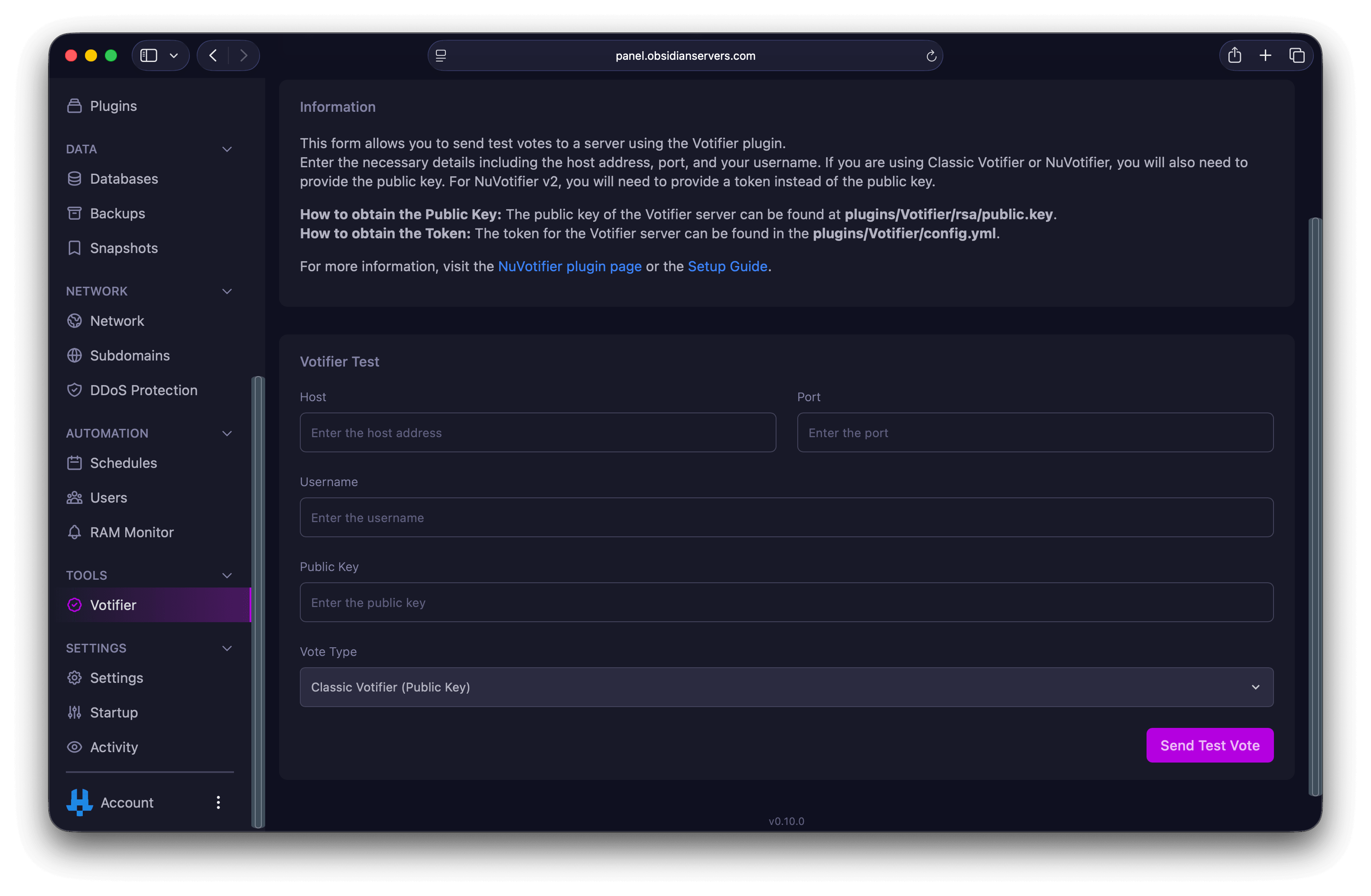
Sending a Test Vote
Step 1: Choose Your Vote Type
Select the protocol version that matches your Votifier setup from the dropdown:
- Classic Votifier (Public Key) - for the original Votifier plugin
- NuVotifier (Public Key) - for NuVotifier using public key authentication
- NuVotifier v2 (Token/Key) - for NuVotifier v2 using token authentication
If you are unsure which version you are running, check which plugin you have installed in your plugins folder. Most modern setups use NuVotifier v2.
Step 2: Fill in the Details
- Host - Your server's address
- Port - The Votifier port (this is not the same as your server's connection port - check your Votifier configuration for the correct port)
- Username - The Minecraft username to send the test vote for
Depending on your vote type, you will also need to enter either:
- Public Key - Found in
plugins/Votifier/rsa/public.keyon your server - Token - Found in
plugins/Votifier/config.ymlon your server
You can find both of these files using the File Manager.
Step 3: Send the Vote
Click Send Test Vote. You will see either a success message confirming the vote was sent, or an error message explaining what went wrong.
Troubleshooting
Vote Sent Successfully but No Reward
- Make sure you have a vote listener plugin installed (such as VotingPlugin or SuperbVote) alongside Votifier
- Check the vote listener plugin's configuration to ensure rewards are set up
- Check the console for any errors from the vote listener plugin
Connection Refused or Timed Out
- Verify the Votifier port is correct (check your Votifier config, not your server's main port)
- Make sure your server is running
- Ensure Votifier is installed and loaded (check the console for Votifier startup messages)
Invalid Key or Token
- Double-check that you copied the full public key or token with no extra spaces
- Make sure you are using the right authentication type for your Votifier version
- Try regenerating the key by deleting the
rsafolder inplugins/Votifier/and restarting the server
Need Help?
If you encounter any issues or need further assistance, you can reach us through:
- Support Ticket
- Discord Server - use the
/supportcommand - Email: [email protected]